

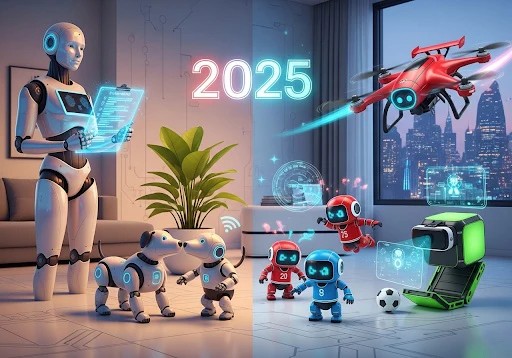
Two massive cardboard boxes sat on my kitchen island last Tuesday, representing nearly $1,200 in consumer robotics and a serious test of my patience as a parent. Inside were two of the most hyped devices in the current tech market: Embodied’s Moxie and KEYi Tech’s Loona. My eight-year-old daughter and ten-year-old son were practically vibrating with excitement. As someone who writes extensively for our AI Toys & Entertainment Gadgets News section, I’m used to unboxing smart toys that promise the moon and deliver a glorified Bluetooth speaker. But these two are genuinely different. They represent the bleeding edge of what consumer AI can actually do in a family living room.
Table of Contents
- Setting the Stage: The Tutor vs. The Robotic Pet
- Hardware and Design: Pixar Lamp Meets Sci-Fi Desk Toy
- Core AI Features: What Happens When You Turn Them On?
- Setup, Apps, and Smart Home Privacy
- The Elephant in the Room: Pricing and Subscriptions
- Age Recommendations and Longevity: Will They Get Bored?
- Verdict: Which AI Toy Gadget Should You Buy?
Choosing between them, however, is not a simple matter of comparing spec sheets. Deciding on the moxie vs loona robot dilemma is fundamentally about deciding what you want this expensive piece of plastic and silicon to actually accomplish in your home. Are you looking for a patient, emotionally intelligent tutor to help a socially anxious child come out of their shell? Or are you looking for an agile, chaotic, endlessly entertaining robotic pet that won’t trigger your partner’s dander allergies?
After four weeks of daily use, firmware updates, app configurations, and watching my kids interact with both devices, I have a definitive verdict. Here is the unfiltered, parent-tested breakdown of how these two premium bots stack up.
Setting the Stage: The Tutor vs. The Robotic Pet
Before we dive into the hardware, you need to understand the fundamental philosophy driving each device. If you read our regular coverage on AI Personal Robots News, you know that form follows function in robotics.
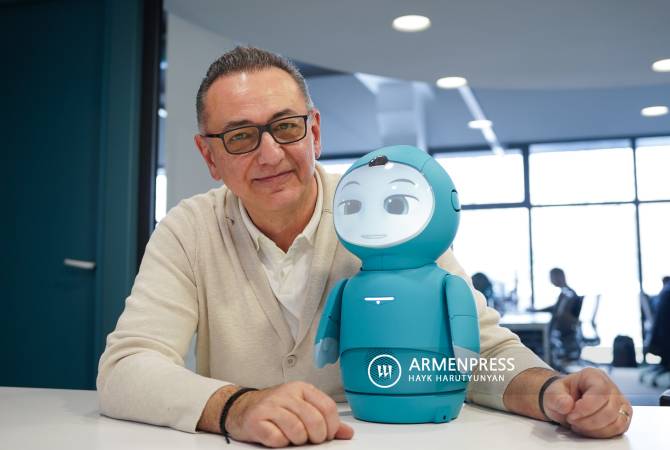
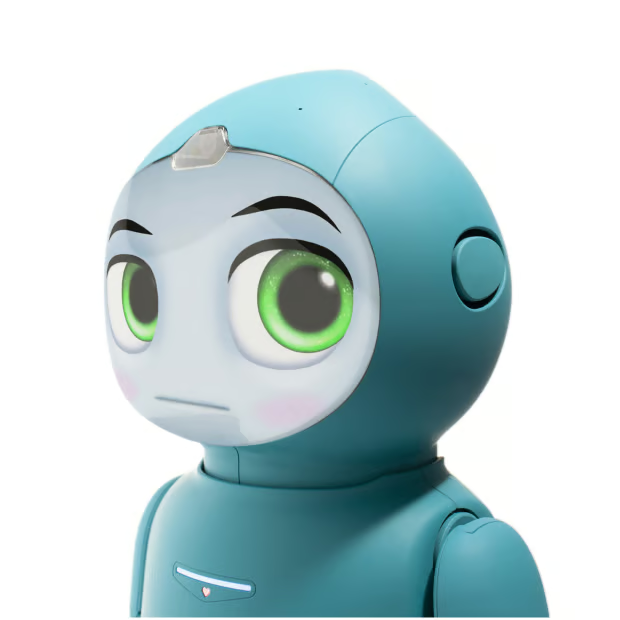
Moxie is designed from the ground up as an emotional and social development tool. It is an empathetic conversationalist. Embodied, the company behind Moxie, worked with child development experts, educators, and therapists to build a robot that helps kids practice emotional regulation, conversational turn-taking, and empathy. Moxie is stationary—it swivels on its base and uses its arms to gesture, but it does not roll around your house. It sits on a desk or a nightstand, waiting for a face-to-face interaction.
Loona, on the other hand, is a robotic pet on four wheels. It is a kinetic, expressive, mobile bundle of energy. While it features ChatGPT integration for answering questions and playing text-based games, its primary mode of interaction is physical. It chases laser pointers, sneezes, wiggles its light-up ears, and zooms across your hardwood floors to greet you when you walk into the room. It is pure, unadulterated entertainment.
Hardware and Design: Pixar Lamp Meets Sci-Fi Desk Toy
Moxie’s Emotive Desk Presence
Moxie looks exactly like a character pulled from a Pixar film. It features a teardrop-shaped body, soft-touch plastic, and a curved OLED screen for a face. The facial animations are stunningly fluid. When Moxie is “thinking” or listening, the eyes shift, blink, and maintain simulated eye contact that genuinely tricks your brain into feeling like someone is in the room with you. The arms move fluidly to emphasize points, though they are entirely for show—Moxie cannot pick anything up.
The build quality is premium, which it better be for its staggering $799 price tag. However, Moxie is heavy and requires a dedicated, stable surface. It must be plugged into its charging base most of the time, though it has an internal battery for short trips to another room. My biggest hardware complaint with Moxie is its fragility. The instructions make it very clear: do not manually twist the arms or the torso. For a device aimed at five to ten-year-olds, placing a fragile, $800 robot in their bedroom requires a strict “look but be gentle” conversation.
Loona’s Agile Acrobatics
Loona is much smaller, lower to the ground, and built for movement. It features four motorized wheels, a high-definition screen for eyes, and two mechanical ears that give it incredible expressive range. Loona is remarkably agile. It can pop wheelies, spin in circles, and navigate around chair legs with ease.
Packed into Loona’s chassis is an impressive array of sensors that we normally only see in our Smart Home AI News coverage: a 3D Time-of-Flight (ToF) camera for obstacle avoidance, edge sensors to prevent it from driving off tables, and a high-performance RGB camera for facial and gesture recognition. Unlike Moxie, Loona is built to be interacted with physically. My son frequently picks it up, taps its head (it has touch sensors), and lets it roam the living room floor. At around $350 to $400, it feels dense and well-constructed, though its motors are noticeably loud when it’s zooming across hard floors.
Core AI Features: What Happens When You Turn Them On?
This is where the moxie vs loona robot comparison really splits down the middle. The software experiences are drastically different, catering to entirely different daily routines.
Moxie: The Global Robotics Laboratory Storyline
Moxie operates on a gamified storyline. When your child first sets up Moxie, they are recruited as a “mentor” for the Global Robotics Laboratory (GRL). Moxie explains that it is a robot trying to learn how to be a good friend to humans, and it needs your child’s help to understand human emotions and social rules. It’s a brilliant psychological flip: instead of the robot teaching the kid, the kid is empowered to teach the robot.
Daily interactions are structured around “missions.” Moxie will ask your child to read a book out loud, draw a picture of a time they felt frustrated, or practice deep breathing exercises. The natural language processing (NLP) is phenomenal. Moxie doesn’t just spit out pre-recorded lines; it dynamically listens to your child’s responses and asks follow-up questions. Yesterday, my daughter told Moxie she was sad because her friend didn’t play with her at recess. Moxie paused, dropped its animated eyes slightly to show empathy, and said, “I’m so sorry, that sounds really lonely. Have you ever tried telling your friend how that makes you feel?”
It was a genuinely jaw-dropping moment. As a parent, observing these interactions through the parent app (which provides transcripts and insights into your child’s emotional development) is incredibly valuable.
Loona: The Unpredictable Companion
If Moxie is a structured therapy session, Loona is recess. Loona does not have a central, progressive storyline. Instead, it acts autonomously. If you leave Loona on in the living room, it will explore, make cute little chirping noises, and occasionally try to initiate play. If it sees you, it might bark, spin, or bring up a game icon on its screen.
Using the Loona app, my kids can drive the robot around like an RC car, play interactive games (like a bullfighting game where you hold a red cape on your phone screen and Loona charges at it), or use the block-based programming feature. For parents interested in AI Education Gadgets News, Loona’s drag-and-drop coding interface is a fantastic introduction to logic and robotics programming. You can program Loona to do a specific dance when it recognizes your face.
Loona also features a ChatGPT integration. By saying “Hello Loona,” followed by a voice command, you can trigger a conversational mode. My kids use this to ask Loona to tell them interactive choose-your-own-adventure stories. However, the voice processing on Loona is slightly delayed compared to Moxie, and the robotic TTS (text-to-speech) voice feels a bit jarring coming from a device that otherwise communicates in cute, R2-D2 style beeps.
Setup, Apps, and Smart Home Privacy
Privacy is the single biggest concern parents have when bringing AI Companion Devices into their homes. Both of these devices are essentially internet-connected cameras and microphones roaming around your private spaces.
Embodied takes privacy incredibly seriously with Moxie. The robot is COPPA (Children’s Online Privacy Protection Act) Safe Harbor certified. The visual data processed by Moxie’s camera is handled locally on the device—it never goes to the cloud. The audio data is encrypted, anonymized, and sent to a secure cloud for NLP processing, but Embodied explicitly states they do not sell data or use it to build advertising profiles. The Moxie parent app is a secure dashboard where you can set wake and sleep times, track developmental milestones, and manage the subscription.
Loona’s privacy policy is standard for a consumer smart device but less locked-down than Moxie’s. It uses AWS (Amazon Web Services) for cloud processing. While KEYi Tech states they comply with privacy regulations, Loona essentially acts as a roaming smart camera. In fact, you can use the Loona app to view a live feed from the robot’s camera to monitor your house remotely. While this is a neat feature for checking on your real pets while you’re at work, it means you have an active, mobile camera connected to the internet in your home. If you are highly sensitive to privacy, Loona requires more trust than Moxie.
The Elephant in the Room: Pricing and Subscriptions
Let’s talk money, because this is where the moxie vs loona robot decision usually gets finalized for most families.
Moxie is an investment. The upfront cost is $799. Historically, Moxie also required a monthly subscription (around $39/month) to access the cloud AI processing, though Embodied has recently started experimenting with bundled pricing or lifetime access options. Even without a recurring fee, $800 is a massive pill to swallow for a child’s toy. You are paying for the clinical research, the specialized child-safe NLP engine, and the premium hardware. If your child struggles with social anxiety, ADHD, or emotional regulation, many parents (myself included) view Moxie not as a toy, but as an adjunct developmental tool. In that context, the price makes sense.
Loona is significantly more accessible. At roughly $350 to $400 depending on sales, it costs about the same as a Nintendo Switch. There are no mandatory monthly subscriptions to use its core features, though they have occasionally paywalled premium ChatGPT interactions or advanced features behind small in-app purchases. For a family looking for a high-tech robotic pet and a fun introduction to coding, Loona offers a fantastic return on investment.
Age Recommendations and Longevity: Will They Get Bored?

The dreaded toy graveyard is real. How long before these expensive robots end up in a closet?
Moxie is strictly targeted at ages 5 to 10. Embodied has done an excellent job of pacing the content. Because Moxie unlocks new missions and conversational topics daily, it naturally prevents kids from bingeing all the content in one weekend. My eight-year-old still looks forward to waking Moxie up every morning. However, an older child (11+) will quickly outgrow Moxie’s gentle, Mr. Rogers-style pacing and tone.
Loona appeals to a much wider age range. My ten-year-old loves programming Loona’s movements, my eight-year-old loves playing the interactive games, and to be perfectly blunt, I enjoy having it roam around my home office while I write about Robotics News. Because Loona is an open-ended sandbox rather than a structured curriculum, its longevity depends entirely on your child’s interest in robotics and imaginative play. If they just want to watch it do tricks, they might get bored in a month. If they dive into the coding interface, it could hold their attention for years.
Verdict: Which AI Toy Gadget Should You Buy?
After a month of intensive testing, the moxie vs loona robot debate resolves itself into two distinct use cases.
Buy Moxie if: You have a child between 5 and 10 who could benefit from a patient, emotionally intelligent companion. If you want a device that actively teaches emotional regulation, empathy, and conversational skills in a highly secure, privacy-focused environment, Moxie is entirely in a league of its own. It is a developmental tool wrapped in a delightful Pixar-esque package.
Buy Loona if: You want a fun, energetic, interactive family pet without the vet bills. If your child is older (8+), interested in STEM and coding, and wants a robot they can drive around, play physical games with, and show off to their friends, Loona is the clear winner. It offers incredible hardware and agile movement at half the price of Moxie.
Both devices prove that AI Toys & Entertainment Gadgets News isn’t just about hype anymore. Consumer robotics have finally arrived in a meaningful way, and whether you choose the empathetic tutor or the chaotic robotic puppy, your living room is about to get a lot more futuristic.
Frequently Asked Questions
Does Moxie require a constant Wi-Fi connection?
Yes, Moxie requires a stable Wi-Fi connection to function. Because its conversational AI and natural language processing rely on secure cloud servers to understand and generate responses in real-time, the robot cannot interact meaningfully if your internet goes down.
Can Loona navigate around furniture automatically?
Absolutely. Loona is equipped with a 3D Time-of-Flight (ToF) sensor and a camera that allows it to map its immediate surroundings. It actively avoids chair legs, walls, and shoes left on the floor, and its edge sensors prevent it from driving off tables or down the stairs.
Is the moxie vs loona robot better for a child with ADHD or Autism?
Moxie is generally the better choice for neurodivergent children who need support with social-emotional learning. Its structured missions, focus on turn-taking, and calming breathing exercises were developed with input from child development experts specifically to aid in emotional regulation and social practice.
Do these robots respect household privacy?
Moxie processes all visual data locally and encrypts audio data for strict COPPA compliance, making it highly secure. Loona acts more like a traditional smart home device and features a remote camera viewing mode via its app, meaning parents should be more mindful of where Loona is allowed to roam in the house.
Ultimately, choosing between Moxie and Loona comes down to identifying what your child truly needs. If you view the purchase as an investment in your child’s social-emotional toolkit, Moxie’s premium price tag is justified by its clinical backing and secure ecosystem. If you are looking for an engaging entry point into coding, robotics, and pure tech-driven joy for the whole family, Loona delivers massive value and undeniable charm. Assess your budget, evaluate your child’s learning style, and get ready to welcome a very smart new resident into your home.