



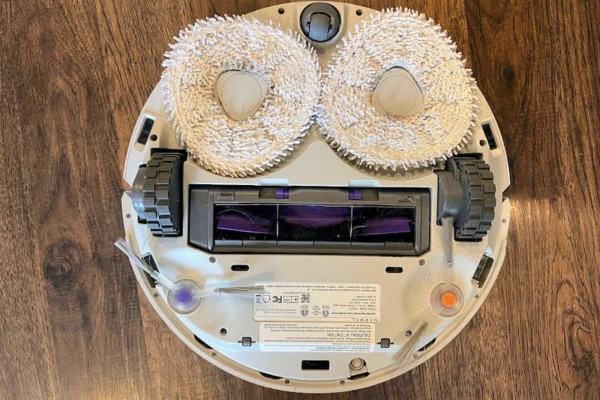
I woke up last Tuesday to find my Roborock S7 MaxV aggressively ramming into the baseboards of my hallway, convinced it was navigating a phantom room that extended straight through my neighbor’s apartment. I checked the companion app, and sure enough, the map looked like an abstract Picasso painting. Rooms were overlapping, walls were skewed at 45-degree angles, and my charging dock was apparently located somewhere in the fourth dimension.
If you own a smart vacuum, you’ve probably experienced this. You buy these devices to automate your life, but when the SLAM (Simultaneous Localization and Mapping) algorithm aggressively shits the bed, you end up spending more time babysitting the bot than you would have spent just vacuuming the floor manually.
I’ve spent the better part of five years tearing down, rooting, and debugging autonomous cleaning bots. In this guide, I’m going to walk you through a definitive robot vacuum mapping error fix protocol. We aren’t just going to cover the basic “wipe your sensors” advice—though we will touch on why that matters at a hardware level. We’re going to dive into odometry drift, LiDAR motor degradation, MQTT map payload interception, and how to use custom firmware like Valetudo to rip your map data out of the cloud so you can control it locally.
The Anatomy of a Mapping Failure: SLAM and Odometry
To fix the software, you have to understand how the hardware perceives the world. Most mid-to-high-end vacuums rely on LiDAR (Light Detection and Ranging). The spinning turret on top of the bot fires an infrared laser 360 degrees, measuring the time of flight (ToF) of the reflected light to calculate distance. This creates a 2D point cloud of your room.
But LiDAR alone doesn’t build the map. The robot relies on an algorithm called SLAM. It combines the LiDAR point cloud with odometry—data from the wheel encoders that tell the robot how far it has traveled. If the wheel encoders say, “We moved forward 10 centimeters,” but the LiDAR point cloud says, “The wall only got 8 centimeters closer,” the SLAM algorithm has to reconcile that discrepancy.
When the algorithm fails to reconcile this data, or when it falsely identifies a location (a failure of “loop closure”), the map fractures. You get overlapping rooms, slanted hallways, and ghosts in the machine.
The Hardware-Level Robot Vacuum Mapping Error Fix Checklist
Before we SSH into the vacuum and start parsing JSON payloads, we have to rule out hardware and environmental anomalies. Bad data in equals bad data out.
1. The “Ghost Room” Mirror Problem
LiDAR relies on light reflection. Floor-to-ceiling windows, sliding glass doors, and mirrored sliding closet doors will completely destroy a SLAM map. The laser hits the mirror, bounces off the wall behind the robot, bounces back to the mirror, and hits the sensor. The robot calculates this time of flight and assumes there is a massive, identical room on the other side of the glass.
The Fix: If you’re running stock firmware, immediately draw a “No-Go Zone” or a “Virtual Wall” right at the mirror’s edge. Do this before the robot completes its first full mapping run. If you don’t, the robot will constantly try to drive through the mirror to clean the phantom room, burning battery and messing up its localization.
2. Odometry Drift via Wheel Slippage
This is the most common, least diagnosed cause of slanted maps. If your map suddenly looks like it was rotated 15 degrees on a pivot, your wheels are slipping.
Robot vacuums use dead reckoning between LiDAR scans. If a wheel slips on wet tile, a slick hardwood floor, or a thick rug, the wheel encoder registers movement that didn’t happen in the physical world. The robot updates its internal coordinates, but the LiDAR says something different. Over a 45-minute cleaning cycle, this micro-slippage accumulates, causing massive rotational errors.
The Fix: Clean the wheel treads with high-percentage isopropyl alcohol. If the treads are worn completely smooth (common after 18-24 months of daily use), buy replacement wheel modules. They are usually $20-$30 on AliExpress and take ten minutes to swap out. Never let your robot run over freshly mopped floors unless it is specifically designed as a combo unit that adjusts its SLAM parameters for wet traction.
3. LiDAR Motor Degradation (The 300 RPM Rule)
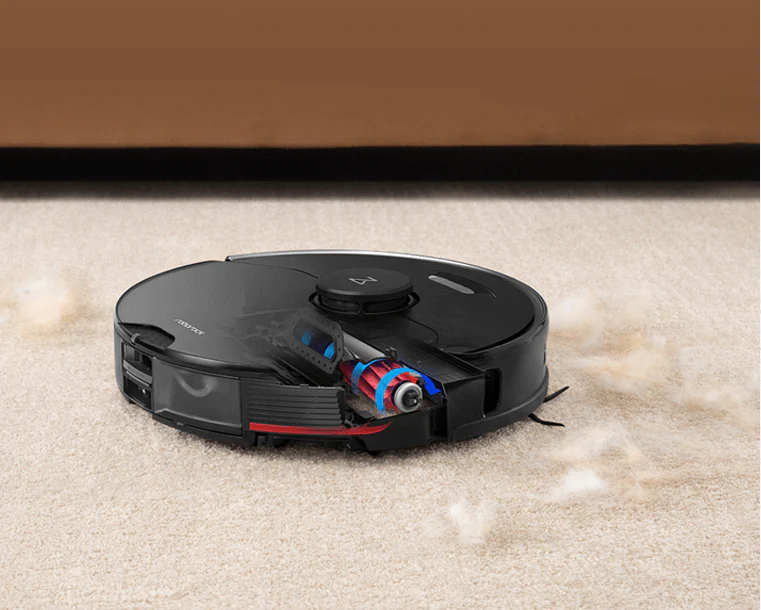
The spinning LiDAR turret (LDS – Laser Distance Sensor) is driven by a tiny, cheap DC motor via a rubber belt. To generate an accurate map, that turret needs to spin at a very precise speed—usually around 5Hz (300 RPM). If hair gets wrapped around the pulley, or if the motor starts dying, the RPM drops. At 4.5Hz, the point cloud stretches, and the mapping algorithm completely breaks down.
If you’re tracking Smart Home AI News, you’ll know manufacturers are trying to replace moving LiDAR parts with solid-state ToF sensors, but for now, the spinning turret is king.
Rooting and Valetudo: Taking Control of the Map
If you are serious about maintaining your smart home, relying on a Chinese server to store and process your floor plan is an architectural nightmare. Stock firmware frequently overwrites a perfectly good local map with a corrupted one during an aggressive cloud sync. This is where Valetudo comes in.
Valetudo is a cloud replacement for vacuum robots. It runs entirely locally on the robot itself. By rooting your vacuum (which usually involves flashing via a USB-to-TTL serial adapter directly on the motherboard), you can install Valetudo and completely isolate the bot from the internet.
Intercepting and Debugging Map Payloads via MQTT
Once you are running Valetudo, your robot will publish its map data via MQTT to your local broker. The map isn’t an image; it’s a heavily compressed JSON payload containing an occupancy grid. Every pixel in the grid represents a physical space (usually 5cm by 5cm) and is assigned a value: Free, Obstacle, or Unknown.
When a mapping error occurs, the dimensions of this grid usually explode. The bot thinks it discovered a new wing of your house, so it dynamically expands the array boundaries. We can write a Python script to monitor this MQTT payload, decompress it, and alert us if the map suddenly gets corrupted.
Here is a script I wrote to monitor my Valetudo map payload. It uses paho-mqtt and zlib to parse the incoming telemetry.
import paho.mqtt.client as mqtt
import json
import zlib
import time

# MQTT Broker Settings
BROKER_IP = "192.168.1.100"
MQTT_PORT = 1883
MAP_TOPIC = "valetudo/robot/MapData/map"
ALERT_TOPIC = "homeassistant/vacuum/map_alert"

# Baseline grid dimensions (adjust to your normal map size)
MAX_SAFE_WIDTH = 800
MAX_SAFE_HEIGHT = 800

def on_connect(client, userdata, flags, rc):
    print(f"Connected to MQTT broker with result code {rc}")
    client.subscribe(MAP_TOPIC)

def on_message(client, userdata, msg):
    try:
        # Valetudo map payloads are zlib compressed JSON
        decompressed_payload = zlib.decompress(msg.payload)
        map_data = json.loads(decompressed_payload)

        # Extract grid dimensions from the first layer
        if "layers" in map_data and len(map_data["layers"]) > 0:
            floor_layer = map_data["layers"][0]
            width = floor_layer["dimensions"]["x"]["max"] - floor_layer["dimensions"]["x"]["min"]
            height = floor_layer["dimensions"]["y"]["max"] - floor_layer["dimensions"]["y"]["min"]

            print(f"Current Map Dimensions: {width} x {height}")

            # Detect map explosion (SLAM corruption)
            if width > MAX_SAFE_WIDTH or height > MAX_SAFE_HEIGHT:
                print("CRITICAL: Map bounds exceeded normal parameters. SLAM corruption detected!")
                client.publish(ALERT_TOPIC, "MAP_CORRUPTED", retain=False)
                # Here you could trigger an API call to halt the vacuum

    except Exception as e:
        print(f"Error parsing map payload: {e}")

client = mqtt.Client()
client.on_connect = on_connect
client.on_message = on_message

client.connect(BROKER_IP, MQTT_PORT, 60)
client.loop_forever()
This script is a lifesaver. If the vacuum gets wedged under a couch, its wheels slip, and it starts drawing a hallway through your backyard, the grid dimensions will spike. This script catches the spike and publishes an alert to Home Assistant. You can then trigger an automation to immediately stop the vacuum and send it back to the dock before it overwrites your saved map.
Debugging Raw Logs for Hardware Failures
If you’re already rooted, you don’t have to guess why your vacuum is acting drunk. You can literally read the robot’s mind. Most of these vacuums run an embedded Linux distribution (often Ubuntu or a Yocto-built system) running ROS (Robot Operating System) or a proprietary equivalent.
If you suspect the LiDAR motor is failing or the bumper sensors are stuck, SSH into the vacuum. You can check the kernel ring buffer or the application logs.
# SSH into your rooted vacuum
ssh [email protected]

# Check the dmesg logs for serial communication errors with the LDS
dmesg | grep -i lds

# Alternatively, check the live valetudo logs for rotation speed errors
journalctl -u valetudo -f | grep "rpm"
If you see log entries complaining that the LDS RPM has dropped to 250 or is fluctuating wildly, you’ve found your problem. You don’t need a software reset; you need a $5 replacement motor and a screwdriver. Working closely with AI Sensors & IoT News, I’ve seen a massive uptick in predictive maintenance algorithms trying to catch this RPM drop before the map ruins itself, but for older bots, you have to monitor it yourself.
Home Assistant: The Automated Map Reset
Let’s say you aren’t rooted, and you are running stock firmware via the official app (Roborock, Dreame, Roomba, etc.). You can still implement a robust robot vacuum mapping error fix using Home Assistant.
The biggest issue with cloud-synced vacuums is that if they complete a run while disoriented, they will save the bad map. The trick is to interrupt the cleaning cycle if the robot takes unusually long to clean a standard room. Disorientation causes the bot to ping-pong around aimlessly, drastically increasing cleaning time.
Here is a Home Assistant YAML automation that monitors the cleaning time of the kitchen. If it takes longer than 25 minutes (it usually takes 10), it assumes the bot is lost, stops it, and forces it home to prevent a map overwrite.
alias: "Vacuum: Prevent Map Corruption via Timeout"
description: "Halts the vacuum if it takes too long to clean, indicating SLAM failure."
trigger:
  - platform: state
    entity_id: vacuum.roborock_s7
    to: "cleaning"
condition: []
action:
  - wait_for_trigger:
      - platform: state
        entity_id: vacuum.roborock_s7
        to: "returning"
    timeout:
      hours: 0
      minutes: 25
      seconds: 0
      milliseconds: 0
    continue_on_timeout: true
  - if:
      - condition: state
        entity_id: vacuum.roborock_s7
        state: "cleaning"
    then:
      - service: vacuum.stop
        target:
          entity_id: vacuum.roborock_s7
      - service: notify.mobile_app_my_phone
        data:
          title: "Vacuum Disoriented!"
          message: "Cleaning exceeded 25 minutes. Halting to prevent map corruption."
      - delay:
          hours: 0
          minutes: 0
          seconds: 10
          milliseconds: 0
      - service: vacuum.return_to_base
        target:
          entity_id: vacuum.roborock_s7
mode: single
Camera-Based vSLAM vs. LiDAR
I would be remiss if I didn’t mention vSLAM (Visual SLAM). Brands like iRobot (Roomba) historically relied heavily on upward-facing cameras to navigate by mapping your ceiling, rather than using LiDAR. If you read AI-enabled Cameras & Vision News, you’ll know that modern vSLAM is incredibly sophisticated, but it has a massive Achilles heel: Light.
If you run a vSLAM robot vacuum at night in a dark house, it is completely blind. It will fall back purely on odometry and bump-sensors, which guarantees a map failure. If you are using a camera-based bot, your primary robot vacuum mapping error fix is simply scheduling. Only run the bot during the day, or integrate it with your smart lighting to turn on the lights in the room the bot is currently cleaning.
Advanced Firmware Map Restorations
Sometimes, despite your best efforts, the map gets corrupted and saved. If you are using stock firmware, you usually have a “Restore Map” or “Use Backup Map” option hidden in the settings. Always use this immediately. Do not try to let the robot “figure it out” on the next run. A corrupted map poisons the well; the SLAM algorithm uses the existing map to localize. If the map is wrong, the localization will be wrong.
If you are on Valetudo, you can actually back up the raw map JSON and push it back to the robot if things go sideways. I keep a pristine backup of my floor plan on my NAS. If the robot ever gets confused, I just run a quick curl command to POST my clean map back to the Valetudo API, overriding the corrupted data.
Frequently Asked Questions
Why does my robot vacuum keep creating a slanted map?
Slanted maps are almost exclusively caused by odometry drift due to wheel slippage. When the robot’s wheels spin on a slick surface, the internal wheel encoders register movement that the LiDAR does not see, causing the SLAM algorithm to rotate the map. Clean the wheels with isopropyl alcohol, replace worn treads, and avoid running the vacuum on wet floors.
How do I force my robot vacuum to update its floor plan?
To force a map update without deleting your current map, open your doors, ensure the area is well-lit, and initiate a “Full Clean” or “Mapping Run” from the dock. Do not use zone cleaning or room cleaning, as these modes often restrict the robot from exploring new boundaries. Let it return to the dock autonomously to save the new data.
Can black carpets cause robot vacuum mapping errors?
Yes. Most robot vacuums have infrared cliff sensors on the bottom to prevent them from falling down stairs. Dark or black carpets absorb the infrared light rather than reflecting it back to the sensor, causing the robot to think it is suspended over a cliff. This results in erratic navigation, failed localization, and incomplete maps.
Do I need to delete my map after moving furniture?
No, you do not need to delete your map for minor furniture changes like moving a couch or a dining table. Modern SLAM algorithms are dynamic and will update the occupancy grid during the next cleaning cycle. However, if you do major renovations that change the actual walls of the room, starting with a fresh map is highly recommended.
Final Thoughts on Maintaining Autonomous Navigation
Achieving a permanent robot vacuum mapping error fix isn’t about finding a magic button in the app; it’s about understanding how the machine perceives its environment. These robots are a beautiful, fragile dance of hardware sensors and complex SLAM algorithms. When the map corrupts, it’s a symptom of a data conflict—usually between the LiDAR point cloud and the wheel odometry.
Stop trusting the cloud to manage your home’s layout. By identifying environmental hazards like mirrors, maintaining the mechanical health of the LDS motor and wheel treads, and utilizing local control through custom firmware or Home Assistant automations, you can stop babysitting your vacuum. Take control of the telemetry, monitor the MQTT payloads, and let the machines do the work they were designed to do.