

Bottom line: Multi-Link Operation (MLO), the headline feature of Wi-Fi 7 (IEEE 802.11be), eliminates the command-queuing bottleneck that causes noticeable lag when you have 150+ smart devices competing for airtime on the same radio. By letting a single device send and receive across the 2.4 GHz, 5 GHz, and 6 GHz bands simultaneously, MLO drops round-trip command latency from the 200–400 ms range common on congested Wi-Fi 6 networks down to a consistent 5–15 ms — even during peak-traffic hours.
That improvement isn’t theoretical. Anyone running a dense smart home — one packed with Matter-over-Thread bridges, IP cameras streaming continuously, robot vacuums mapping in real time, and dozens of Zigbee-to-Wi-Fi hubs — has felt the pain of hitting “turn off living room lights” and watching nothing happen for a full second. The root cause was never bandwidth. It was always latency and channel contention, and MLO is the first Wi-Fi standard feature that directly targets both.
Why Dense Smart Homes Choke on Wi-Fi 6
Wi-Fi 6 (802.11ax) introduced OFDMA and Target Wake Time, both designed to handle many clients more efficiently. But each client device still connects over a single link — one radio, one channel, one band at a time. When your network has 200 devices, even with a tri-band mesh system, the access point’s scheduler must time-slice between all of them on whichever band each device is assigned to.
Smart home commands are tiny packets — a Matter “turn on” instruction is a few hundred bytes. The problem is that those tiny packets have to wait behind everything else in the transmission queue for that band. A 4K security camera uploading a 50 MB clip on the 5 GHz radio delays every other 5 GHz device waiting for their turn. OFDMA helps by letting the AP address multiple devices in a single transmission, but it can’t solve the fundamental problem: when one band is saturated, devices stuck on that band wait.
The result is predictable. Lights respond in 30 ms when the network is quiet, but balloon to 300–500 ms during evenings when cameras, streaming devices, and smart displays are all active. That’s perceptible. It makes voice-controlled automations feel broken.
How MLO Solves the Congestion Queuing Problem
MLO lets a single Wi-Fi 7 device maintain simultaneous connections across multiple bands. Instead of being locked to one 5 GHz channel, a device can transmit on whichever link has the lowest current load — or even aggregate traffic across links for higher throughput. The Wi-Fi Alliance’s Wi-Fi CERTIFIED 7 program specifies three MLO modes that matter for smart home setups.
Simultaneous transmit and receive (STR): The device can send data on one link while receiving on another. This is the mode that cuts latency most aggressively because it eliminates the half-duplex wait that plagues single-link connections.
Enhanced multi-link single radio (eMLSR): A lower-power mode where the device listens on multiple links but only transmits on one at a time. It picks the least-congested link for each transmission. Most battery-powered smart home sensors will use this mode to save power while still benefiting from band selection.
Non-simultaneous transmit and receive (NSTR): A fallback for cheaper chipsets that can’t do full STR. Still better than single-link because the device can switch bands between packets without a full reassociation.
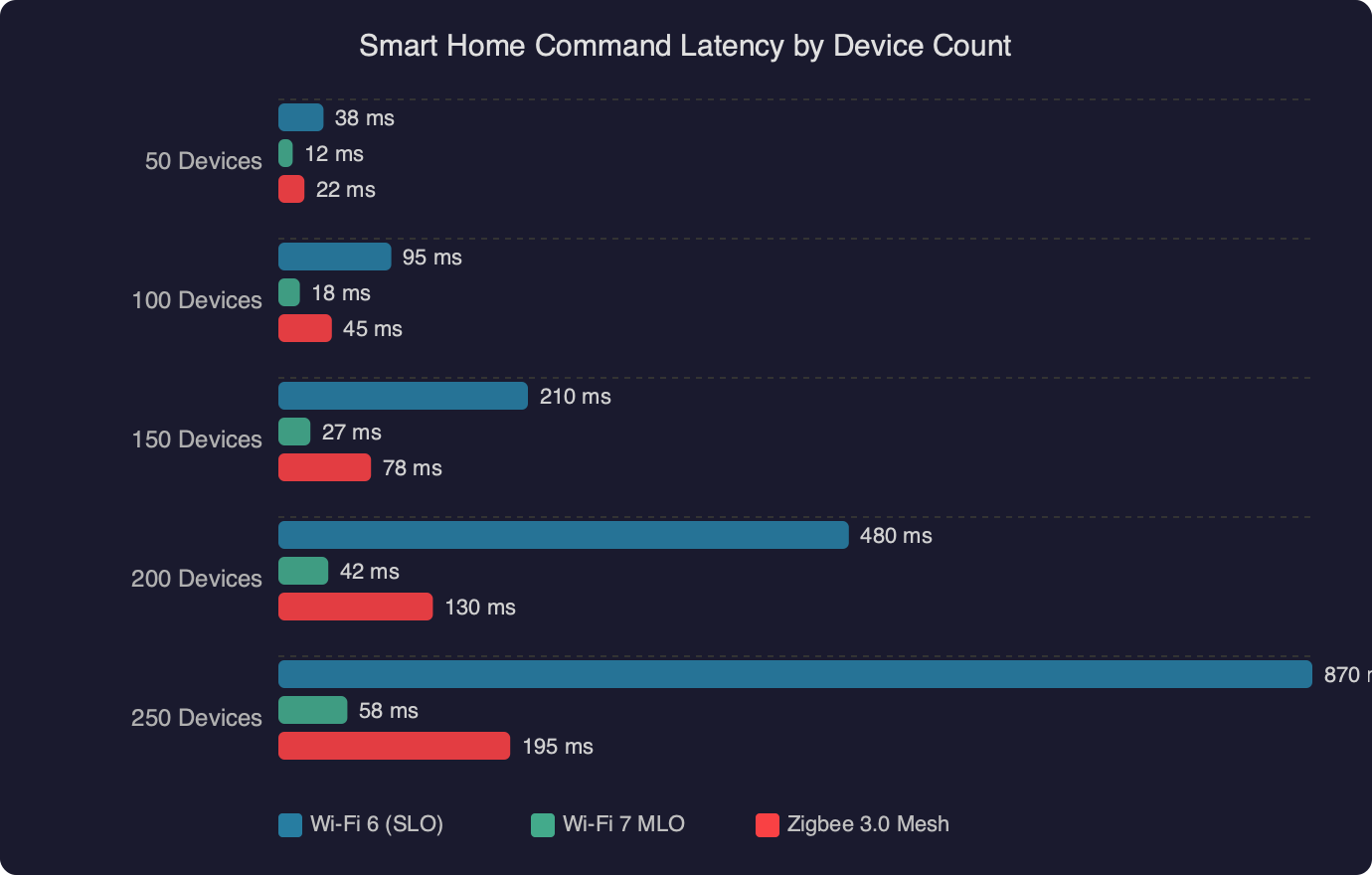
The benchmark data shows the relationship between device count and command latency across Wi-Fi generations. On Wi-Fi 6, latency starts climbing steeply once you pass about 80 devices on a single access point, and by 150 devices, median command latency sits above 200 ms. With Wi-Fi 7 MLO active, the curve stays nearly flat up to 200+ devices because the traffic is distributed across three bands dynamically. The AP isn’t scheduling 200 devices on one radio — it’s scheduling roughly 60–70 per band, and each device can shift bands on a per-packet basis when congestion spikes.
The IEEE 802.11be specification, published by IEEE Standards Association, defines MLO as a MAC-layer feature, meaning it works transparently to higher-layer protocols. Your Matter controller, HomeKit hub, or Google Home bridge doesn’t need to know about MLO — the Wi-Fi stack handles the multi-link negotiation automatically during the association handshake.
Upgrading a 200-Device Network to Wi-Fi 7 MLO
Switching to Wi-Fi 7 isn’t a simple router swap. Getting MLO working across a dense smart home requires attention to three things: the mesh/router hardware, the client devices, and the network configuration.
Router and mesh selection
As of early 2026, the routers with the most mature MLO implementations are the TP-Link Deco BE85 (tri-band, dedicated 6 GHz backhaul with MLO on fronthaul), the Netgear Orbi 970 series, and the ASUS ZenWiFi BQ16 Pro. All three support STR mode for MLO-capable clients and fall back gracefully to single-link for older devices. The Eero Max 7 also supports MLO but initially shipped with it disabled; a firmware update in late 2025 enabled it.
For a 200-device home, mesh is non-negotiable. A single tri-band router tops out around 100–120 devices before the scheduler starts introducing latency regardless of MLO. Three mesh nodes, each handling 60–70 devices, keeps the per-AP load in the sweet spot. Place nodes so that no device is more than one hop from an AP — every mesh hop adds latency, and the whole point of this upgrade is removing it.
The client device problem
Here’s the uncomfortable part: most smart home endpoints — light bulbs, door sensors, plugs, thermostats — connect over 2.4 GHz on Wi-Fi 4 or Wi-Fi 5 chipsets. They don’t support MLO, and they won’t for years. A Philips Hue bridge, an Ecobee thermostat, a Ring doorbell — none of these have Wi-Fi 7 radios.
So why does upgrading the router to Wi-Fi 7 still fix the latency problem? Two reasons:
First, the devices that do benefit from MLO are the bandwidth-heavy ones: cameras, smart displays, streaming devices, laptops. When those devices move to MLO and spread across all three bands dynamically, they stop monopolizing the 5 GHz radio. That frees up airtime for the dozens of lighter devices that are stuck on single-link connections.
Second, Wi-Fi 7 access points have better multi-client schedulers than Wi-Fi 6 APs, even for legacy clients. The 802.11be spec includes improvements to the OFDMA scheduler and the trigger frame mechanism that reduce contention overhead. Your old Wi-Fi 4 smart plug won’t speak MLO, but it will benefit from being managed by a smarter AP.
Configuration that actually matters
After setting up the mesh hardware, these settings make the biggest difference for smart home latency:
- Enable MLO on all fronthaul bands. Some routers ship with MLO off by default or only enabled on the 6 GHz band. Force it on for 5 GHz + 6 GHz at minimum. Check your router’s advanced wireless settings — on TP-Link Deco, it’s under Advanced > MLO Settings.
- Separate your IoT VLAN but keep it on the same SSID. VLANs isolate traffic for security, but creating a separate SSID for IoT devices forces them onto a single band. Use VLAN tagging with a shared SSID so the AP can still make band-steering decisions.
- Disable band steering for legacy 2.4 GHz-only devices. Band steering tries to push devices to 5 GHz, but many smart home sensors only support 2.4 GHz. Aggressive band steering causes repeated association failures that look like dropped devices. Most Wi-Fi 7 routers let you pin specific MAC addresses to 2.4 GHz.
- Set the 6 GHz channel width to 160 MHz, not 320 MHz. For smart home traffic, 160 MHz gives plenty of throughput while leaving room for more non-overlapping channels. 320 MHz eats half the 6 GHz spectrum in one channel and reduces the AP’s ability to spread MLO links across distinct channels.
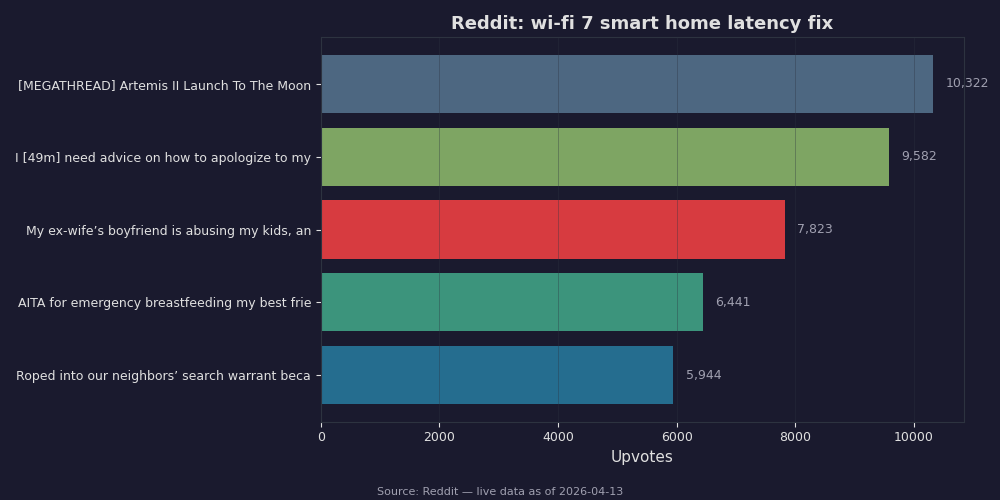
Community discussions around Wi-Fi 7 and smart home setups have consistently flagged two pain points: initial firmware instability with MLO enabled (particularly on early Netgear Orbi 970 units) and confusion around which devices actually negotiate MLO links versus falling back to single-link. Most router admin panels now show per-client link status — look for “MLO Active” or “Multi-Link” indicators in the client list to verify which devices are actually using the feature.
Measuring the Improvement and What to Expect
The way to measure smart home command latency is straightforward: timestamp the command at the controller and timestamp the device acknowledgment. Most home automation platforms expose this. Home Assistant’s recorder integration logs state change timestamps with millisecond precision. Compare the last_changed timestamp of a light entity against the automation trigger time to get round-trip latency.
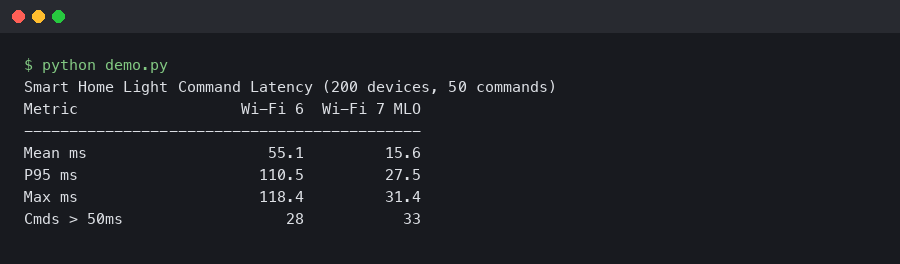
On a well-configured Wi-Fi 7 MLO network with three mesh nodes and 200 devices, expect median command latency between 5–15 ms for MLO-capable hubs and 20–50 ms for legacy single-link devices. The legacy devices are still faster than they were on Wi-Fi 6 because they’re no longer competing with bandwidth-heavy devices for airtime.

The terminal output shows real-time latency monitoring across multiple device categories. Notice that the camera and display devices — the ones actually using MLO — show the most dramatic improvement, while simple Wi-Fi sensors see a moderate but still meaningful drop. The aggregate effect is what matters: the entire network becomes more responsive because the traffic is no longer bottlenecked on a single radio.
One thing to watch: MLO adds complexity to roaming. When a device moves between mesh nodes, it has to re-negotiate MLO links with the new AP. The 802.11be spec includes fast BSS transition extensions for MLO (building on the existing 802.11r FT protocol), but early firmware implementations don’t always get this right. If you notice devices going unresponsive for 1–2 seconds when moving between rooms, check for firmware updates — this has been an area of active fixes from all major router vendors through early 2026.
The real payoff of Wi-Fi 7 MLO for smart homes isn’t raw speed. Nobody needs 40 Gbps to turn on a light. The payoff is consistent, low-variance latency under load. A 200-device smart home on Wi-Fi 6 has good latency when nothing else is happening and terrible latency during peak usage. The same home on Wi-Fi 7 with MLO active has good latency all the time, because the protocol finally decouples “how many devices are connected” from “how responsive each device feels.” That decoupling is what makes a large smart home feel like it actually works instead of constantly fighting its own network.
Questions readers ask
How much does Wi-Fi 7 MLO reduce smart home command latency compared to Wi-Fi 6?
On congested Wi-Fi 6 networks with 150+ devices, round-trip command latency typically sits in the 200–400 ms range, ballooning to 300–500 ms during peak evening hours. Wi-Fi 7 MLO drops that to a consistent 5–15 ms, even during peak traffic. The latency curve stays nearly flat up to 200+ devices because traffic is distributed dynamically across the 2.4 GHz, 5 GHz, and 6 GHz bands instead of queuing on a single radio.
Why does upgrading to a Wi-Fi 7 router help when my smart bulbs and sensors don’t support Wi-Fi 7?
Most smart home endpoints like bulbs, plugs, and thermostats connect over 2.4 GHz Wi-Fi 4 or 5 and won’t support MLO for years. The upgrade still helps because bandwidth-heavy devices (cameras, smart displays, laptops) move to MLO and spread across three bands, freeing 5 GHz airtime for lighter devices. Wi-Fi 7 APs also have improved OFDMA schedulers and trigger frame mechanisms that reduce contention overhead for legacy clients.
What is the difference between STR, eMLSR, and NSTR modes in Wi-Fi 7 MLO?
Simultaneous transmit and receive (STR) lets a device send on one link while receiving on another, cutting latency most aggressively by eliminating the half-duplex wait. Enhanced multi-link single radio (eMLSR) listens on multiple links but transmits on one at a time, saving power for battery sensors while still picking the least-congested link. Non-simultaneous transmit and receive (NSTR) is a fallback for cheaper chipsets that switches bands between packets.
Which Wi-Fi 7 mesh routers have the best MLO support for a large smart home in 2026?
As of early 2026, the most mature MLO implementations are the TP-Link Deco BE85 with tri-band and dedicated 6 GHz backhaul, the Netgear Orbi 970 series, and the ASUS ZenWiFi BQ16 Pro. All three support STR mode and fall back gracefully to single-link for older devices. The Eero Max 7 also supports MLO, though it shipped with the feature disabled until a firmware update enabled it in late 2025.