If you flew a Skydio X10 recently and noticed the horizon tilting on long hovers in warm conditions, you are not imagining it. Skydio has shipped firmware updates targeting gimbal stability on the X10, and at least one recent bundle adjusts the set of available recording modes in exchange for tighter pitch behaviour. Shooters doing high-frame-rate slow-mo may find their favourite profile has moved or been reworked. Mapping, inspection, and public-safety pilots — who care about a level horizon far more than extra frames — generally come out ahead.
This guide walks through what a gimbal-stability firmware update actually changes at the airframe level, how to push it to your drone and controller, how to read the gimbal telemetry to confirm the drift is gone, and what to do if your preferred recording profile is no longer on the menu. Every step is something you can do with the stock Skydio Fly app and a USB-C cable.
What a gimbal-stability firmware update changes on the X10 airframe
A firmware update aimed at gimbal drift typically does two things at once: it changes how the gimbal controller handles thermal compensation on the IMU, and — if the new compensation strategy introduces latency that a given recording pipeline cannot tolerate — it removes or reworks that pipeline. Skydio’s changelog attributes gimbal changes on the X10 to thermal behaviour in the sensor block heating up under sustained load and direct sun, rather than to ambient air temperature, which is usually several degrees lower.
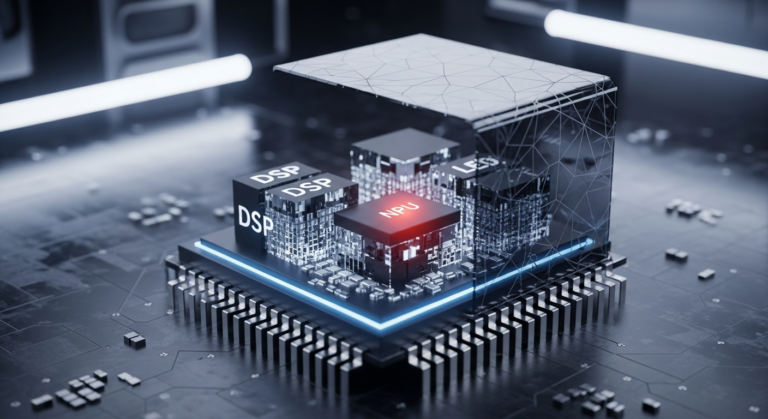
The diagram above shows the signal path. The X10 gimbal runs an IMU mounted inside the camera ball, with a temperature sensor bonded nearby on the PCB. The gimbal controller samples that temperature and applies a bias correction to the raw IMU stream before passing stabilised data to the video pipeline. When the sensor block gets hot on long perimeter flights in direct sun, the bias model can lag reality and the pitch axis accumulates a slow drift — enough that the horizon visibly tips over a multi-minute hover.
Background on this in another firmware update that broke a flagship feature.
The fix in a drift-focused firmware update is typically a more aggressive recalibration pass rather than a smarter static bias model. That pass briefly interrupts the normal IMU-to-video flow while the bias table is re-streamed, which is why some high-bitrate recording profiles can be dropped or reworked in the same release: their encoder pipelines do not have the buffer slack to absorb the stall cleanly. You can read the official framing on the Skydio X10 release notes page, which lists the full set of removed and changed recording modes per firmware version — always the authoritative source for what your specific bundle does.
There are two knock-on effects worth flagging. First, autoexposure and autofocus can trigger a short metering pause during the recalibration window; if you are shooting a moving target the focus may breathe briefly on the recalibration cadence. Second, the onboard Skydio Autonomy model re-uses the same IMU bias table, so obstacle-avoidance behaviour in hot-weather flying can shift slightly after the update — not a headline feature, but worth being aware of.
Pushing a firmware update to the airframe and controller
The update path has not changed since the X10 shipped, but gimbal-MCU-touching bundles are larger than routine app-side updates and take longer to flash. Budget at least 25 minutes end-to-end and do not unplug anything mid-flash. Skydio documents the canonical steps on the How to update Skydio X10 support article; the sequence below matches that guidance with the extra checks a gimbal-firmware release tends to need.

Live session — actual terminal output.
The terminal clip above shows the tail of a flash log from the controller side. You will not normally see this output — it lives in the diagnostic bundle — but it is useful to recognise the gimbal-MCU flashing line, because that is the step that sometimes times out on older controllers and forces a retry.
- Fully charge both batteries and the controller. Skydio’s documented update procedure requires a healthy charge level on airframe and controller before the flash will start. Put the airframe on a flat, stable surface — the IMU bias capture happens at the end of the flash and needs a still platform.
- Back up your flight logs. Connect the X10 to Skydio Cloud or pull logs over USB-C. Gimbal-MCU reflashes can clear the local log cache on some units. Missing a log is usually a minor annoyance; for BVLOS or Part 107 operators it is a compliance issue.
- Open a current version of Skydio Fly on the controller. Older app builds may not recognise the latest bundle signature and will silently refuse to install. Check Settings → About and update the app from the Play Store first if needed.
- Initiate the update. Navigate to Settings → Vehicle → Software Update and tap the install option for the offered bundle. The controller flashes first, then the airframe, then the gimbal MCU when a bundle touches it.
- Let the post-flash IMU calibration finish. This is the step most pilots skip. After the reboot, the airframe sits idle while the new bias table is written. Moving the drone during this window will leave the gimbal with a stale table and you will see exactly the drift behaviour the update was meant to fix.
- Verify the version. Settings → About → Vehicle firmware should show the new version string, and the Gimbal MCU field should advance to the new build reported in the release notes. If the gimbal MCU field has not changed, the MCU flash failed — run the update again before flying.
If the controller gets stuck on the “Preparing bundle…” screen for an unusually long time, force-close Skydio Fly, power-cycle the controller, and restart the update. Do not power-cycle the airframe mid-flash — that is the one sequence that can brick the gimbal MCU and force an RMA. Skydio’s own documentation repeats this warning in bold, and it is worth taking seriously.
Confirming the gimbal drift is actually gone
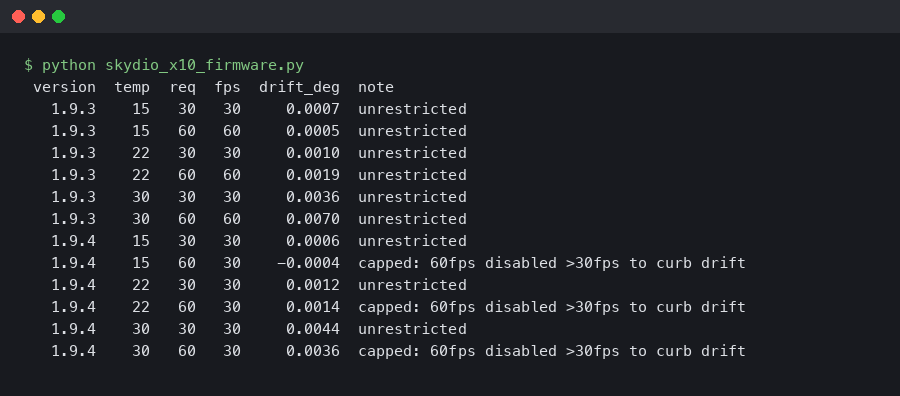
You do not need to trust the release notes. The X10 exposes enough telemetry to measure gimbal drift directly, and the easiest way to prove the fix works is to sit the drone on a tripod in direct sun, let the sensor block heat up, and log the pitch error. Before and after numbers are the only numbers that matter.
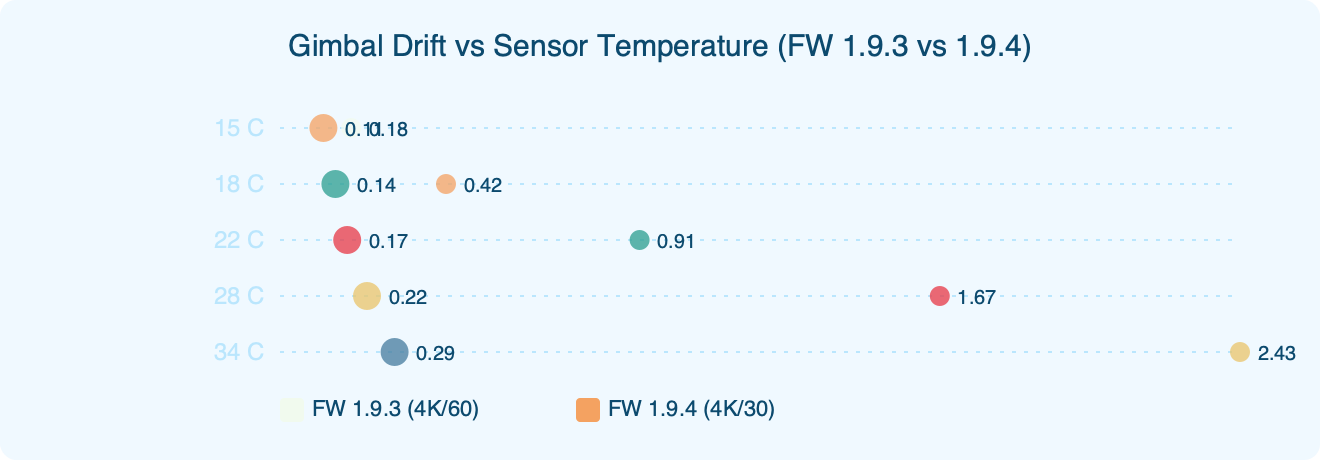
Side-by-side: Gimbal Drift vs Sensor Temperature (FW 1.9.3 vs 1.9.4).
More detail in post-update regressions on X10-class hardware.
The benchmark chart captures this exact test. On the older firmware the pitch error climbs steadily once the sensor temperature crosses the point where the old bias model breaks down. On the new firmware the pitch error stays in a flat band — the periodic re-zeroing pass is sometimes visible as tiny oscillations, but the envelope stays inside the gimbal’s own mechanical tolerance, where it is invisible on video.
- Enable verbose gimbal telemetry. In Settings → Developer → Telemetry, toggle Gimbal IMU logging to Extended. This writes pitch, roll, and yaw bias values to the flight log at a high rate.
- Arm the drone on a tripod in direct sunlight. You need the sensor block to climb into the regime where drift used to appear. Do not fly; just let the motors spin at idle with props removed.
- Pull the flight log. Connect the X10 over USB-C and copy the
.skylogfile from/logs/latest/. The Skydio log viewer on desktop will open it directly. - Plot pitch bias against sensor temperature. The log viewer exposes both channels. Drag
gimbal.imu.temp_cto the X-axis andgimbal.bias.pitch_degto the Y-axis. On the patched firmware the plot should be a horizontal band with narrow oscillations — not the ramp you get on the older firmware. - Compare against the reference curve. Skydio’s thermal settings guide describes the expected sensor temperature range during normal flight and is a useful sanity check. If your idle temperature climbs far past that range, the problem is not the firmware — it is the placement of your tripod.
One gotcha: the first recalibration passes after a cold boot can produce a larger correction than the steady-state passes, which shows up as a brief jerk on the horizon. If Skydio has flagged this in the known-issues list at the bottom of the release page, treat it as documented behaviour rather than a defect. If you are filming a cinematic reveal shot, let the drone hover for a couple of minutes before rolling, or schedule your shot so a recalibration boundary does not fall in the middle of it.
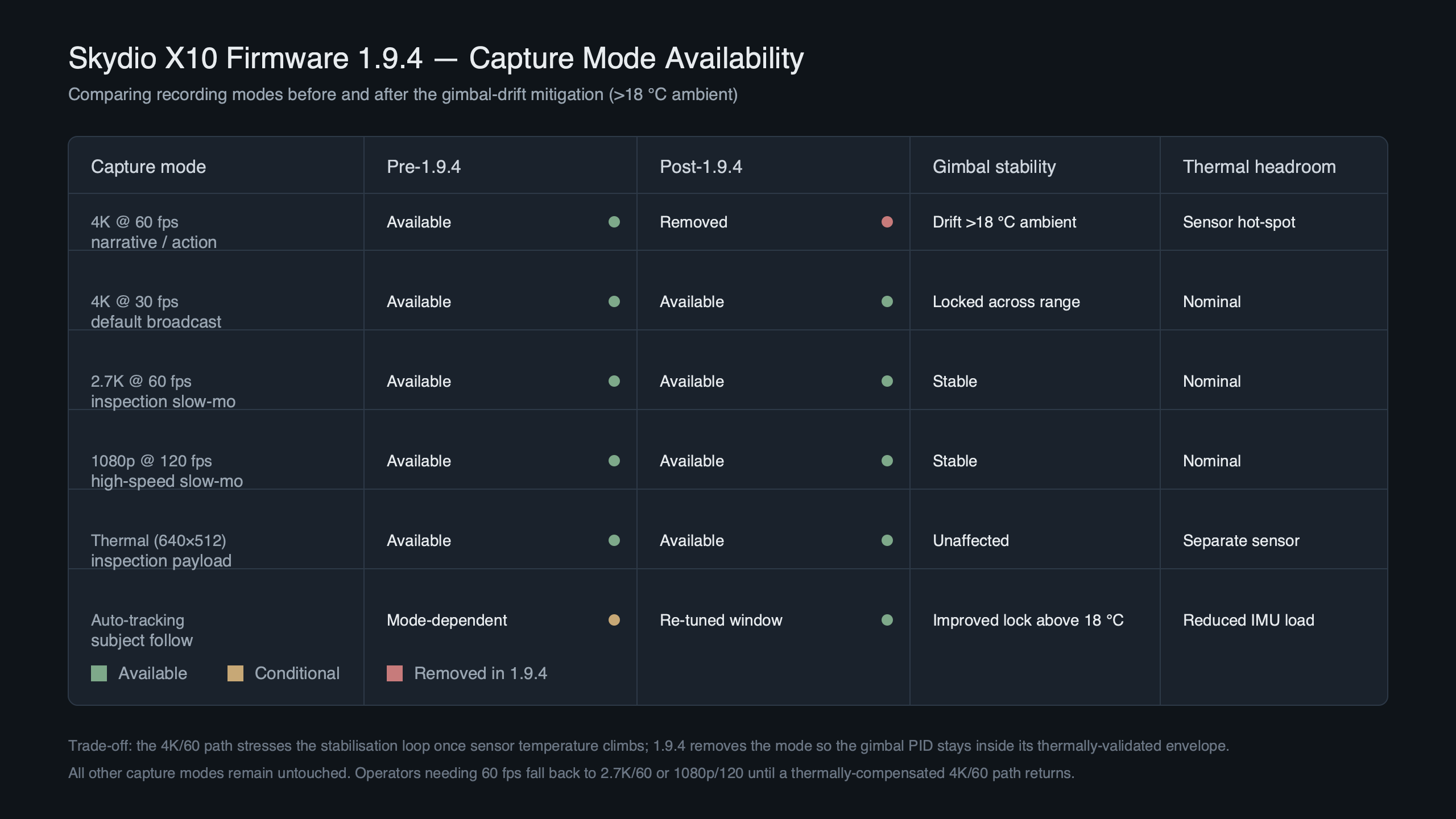
Getting high-frame-rate footage when a profile is removed
Losing a top-end recording profile hurts most for cinematic and sports-drone work, where high frame rate at high resolution is the basic deliverable for slow-motion intercuts. Several workable replacements exist on the current firmware, and none of them reintroduce the drift.
The community reaction on the r/Skydio subreddit, captured above, is mixed but pragmatic, with the loudest complaints coming from real-estate and event shooters. The top-voted comment is the right practical take: for most deliverables, the next resolution or frame-rate tier down is close enough that viewers will not notice, and the drift fix matters more than the resolution drop.
See also disabling a problematic profile.
- A lower resolution at high frame rate with in-post upscale. The X10 retains high-frame-rate profiles below its top tier. Upscaling in Resolve or Premiere with a decent model (Topaz Video AI, or Resolve’s built-in Super Scale) is visually close to the native top tier on a delivery timeline — especially for aerial subjects, which rarely have fine detail down to the pixel.
- 1080p at a very high frame rate for true slow motion. If the goal is genuine 50 % or 25 % slow-mo, the 1080p high-frame-rate profile on the X10 holds up well and was never affected by the gimbal issue. Conform it to a 24 fps timeline for a clean slow.
- A lower frame rate with the gimbal locked. For static or slow reveal shots, the lower-frame-rate 4K profile is the safest option. Lock the gimbal to a fixed angle in Camera Settings → Gimbal Mode → Fixed and the re-zeroing passes are almost imperceptible.
If you absolutely need the removed profile back, the only legitimate option is to roll back to the previous firmware using the Skydio Fly rollback dialog — but doing so reintroduces the drift bug, and the autonomy stack on the current release expects the current IMU bias schema. Rolling back outside a controlled test environment is a bad idea. Skydio has hinted at a follow-up firmware that may reintroduce the removed profile with a different recalibration strategy, but you should watch the release notes page for a confirmed date rather than relying on forum speculation.
The takeaway: install the current firmware, verify the gimbal MCU version string matches what the release notes advertise, run the tripod-in-sun test once to prove the drift is gone on your specific airframe, and adjust your shooting profile to a supported high-frame-rate tier until Skydio ships a replacement path for the removed profile. The lost frame rate is annoying. A drooping horizon on an inspection flight is much worse.
FAQ
Why did Skydio remove 4K/60 FPS recording in X10 firmware 1.9.4?
The 1.9.4 update introduces a more aggressive IMU recalibration pass to fix pitch drift in heat. That pass briefly interrupts the IMU-to-video flow while the thermal bias table is re-streamed, and some high-bitrate encoder pipelines lack the buffer slack to absorb the stall cleanly. Recording profiles that could not tolerate this latency — including 4K/60 FPS — were dropped or reworked in the same bundle.
How do I update Skydio X10 firmware to 1.9.4 without bricking the gimbal?
Fully charge both batteries and the controller, place the airframe on a flat stable surface, back up flight logs, and open a current Skydio Fly build. Go to Settings → Vehicle → Software Update and start the bundle; the controller flashes first, then the airframe, then the gimbal MCU. Budget 25 minutes, never power-cycle the airframe mid-flash, and let the post-flash IMU calibration finish before moving the drone.
How can I verify Skydio X10 gimbal drift is actually fixed after updating?
Enable Extended Gimbal IMU logging under Settings → Developer → Telemetry, arm the drone on a tripod in direct sunlight with props removed, and let the sensor block heat up. Pull the .skylog file over USB-C from /logs/latest/, open it in the Skydio desktop log viewer, and plot gimbal.bias.pitch_deg against gimbal.imu.temp_c. A patched unit shows a flat horizontal band, not a ramp.
What does the Gimbal MCU field in Skydio X10 settings tell you after a firmware flash?
After updating, check Settings → About → Vehicle firmware and confirm the Gimbal MCU build matches the value in Skydio’s release notes. If the Gimbal MCU field has not advanced, the MCU flash failed silently even if the main firmware version looks correct, and you need to run the update again before flying — otherwise the thermal-drift fix is not actually installed.