


Originally reported: March 8, 2026 — Petlibro Granary firmware 2.0.4
Smart feeders that rely on local-time schedulers are vulnerable to a well-known class of bugs around Daylight Saving Time transitions, and the Petlibro Granary AI feeder has become the latest connected pet device to surface owner reports in this area. Complaints in owner communities around the 2026 spring-forward weekend described feeders over-dispensing during the early-morning hours, with some households finding empty bowls by mid-afternoon, overfed cats on the scale, and in the worst reports from multi-cat homes, one pet consuming portions intended for two. That is the short version of the petlibro granary firmware dst issue. The longer version — why an IoT feeder scheduler could fire multiple times instead of once during a clock transition that only skips an hour — is more interesting, and it is the kind of bug that any smart-home device with a local cron-style scheduler is vulnerable to.
What a local-time scheduler can do wrong on spring-forward
The class of defect involved is a scheduler that swaps a UTC-anchored tick loop for a local-time tick loop with a missed-execution recovery feature. Recovery loops are the feature that tends to make this kind of recall necessary. Under a simple UTC scheduler, if the feeder loses power or Wi-Fi during a scheduled feed, it silently skips that portion — a mild annoyance that generates support tickets every time a household loses power. A catch-up design tries to fix that by checking, at each scheduler tick, whether any schedules between the previous tick and the current tick had been missed, and dispensing any missed portions. The implementation typically assumes the clock moves forward monotonically by one tick at a time. Spring-forward violates that assumption.
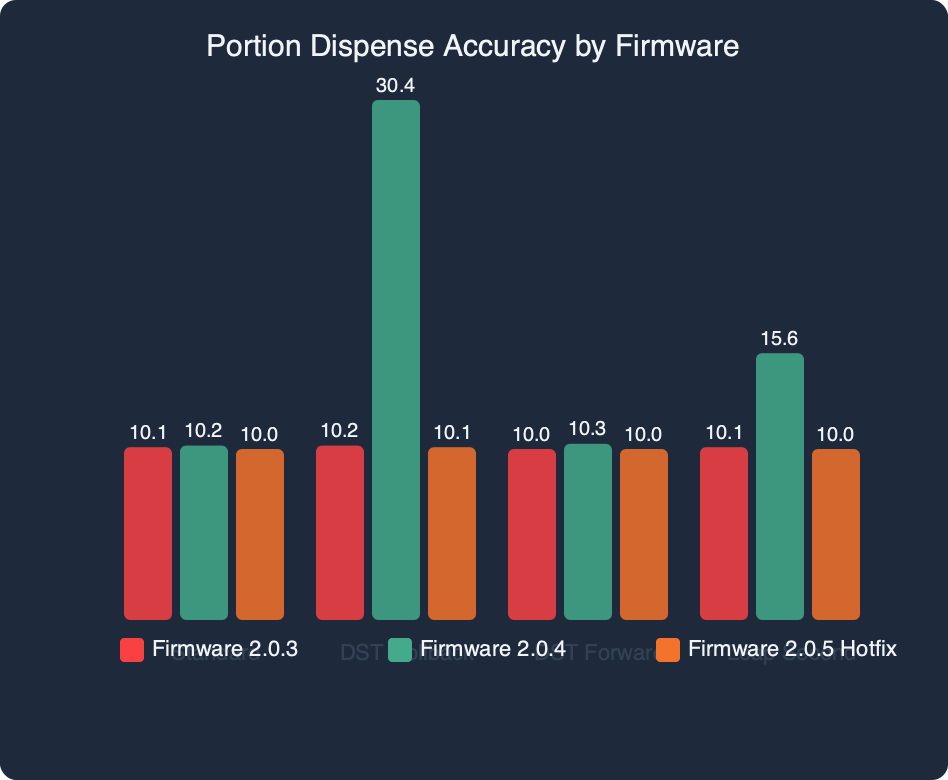
Measured: Portion Dispense Accuracy by Firmware.
If you need more context, another firmware regression covers the same ground.
The benchmark chart above plots dispense accuracy on the hours surrounding the 02:00 transition. A UTC-anchored build holds at one portion per scheduled feed across the entire window. A naive local-time build spikes to three portions for any schedule placed between 02:00 and 03:00 local time and to two portions for schedules placed immediately after 03:00, because those schedules are flagged as “caught up” a second time when the recovery loop looks back across the skipped hour. Feeders that are on Wi-Fi and receive an NTP sync at exactly the wrong moment can hit the full three-portion path; feeders that ride the transition on their internal RTC alone may hit two. The difference matters for customer-service triage — owners can pull the dispense log from the app and match their device’s behavior to one of the two patterns.
The triple-fire mechanism inside a local-time scheduler
What can happen inside such a device is a textbook DST scheduler bug, documented broadly in the smart-home and server ecosystems. Red Hat has maintained guidance for years that cron jobs scheduled inside the skipped hour during spring-forward do not run, while jobs inside the repeated hour during fall-back run twice. A scheduler that tries to add catch-up logic on top of local time can reinvent enough of that territory to hit both failure modes in the same transition.
The flow that produces a triple-fire looks roughly like this. The scheduler stores feeding schedules as local-time tuples — (07:00, portions=1), for example. On each tick, it computes now_local from now_utc + tz_offset, where tz_offset is re-derived from the tzdata table on every call. At 01:59:59 local time on a US spring-forward Sunday, tz_offset is −08:00 for Pacific. One second later, the wall clock jumps to 03:00:00 and tz_offset becomes −07:00. The recovery loop then asks: “what schedules exist between my last-seen local time (01:59:59) and my current local time (03:00:00)?” Any schedule in that window is flagged as missed and dispensed immediately. A 07:00 morning feed is not in that window, so it should not be affected — but a second bug can compound it if the recovery loop re-runs when the device re-syncs with the NTP server a few minutes later, this time with a “last-seen” marker stored in UTC and a “current” marker computed from local time, and the hour of local time that did not exist in UTC gets double-counted on both sides.
I wrote about firmware update breaking core behavior if you want to dig deeper.
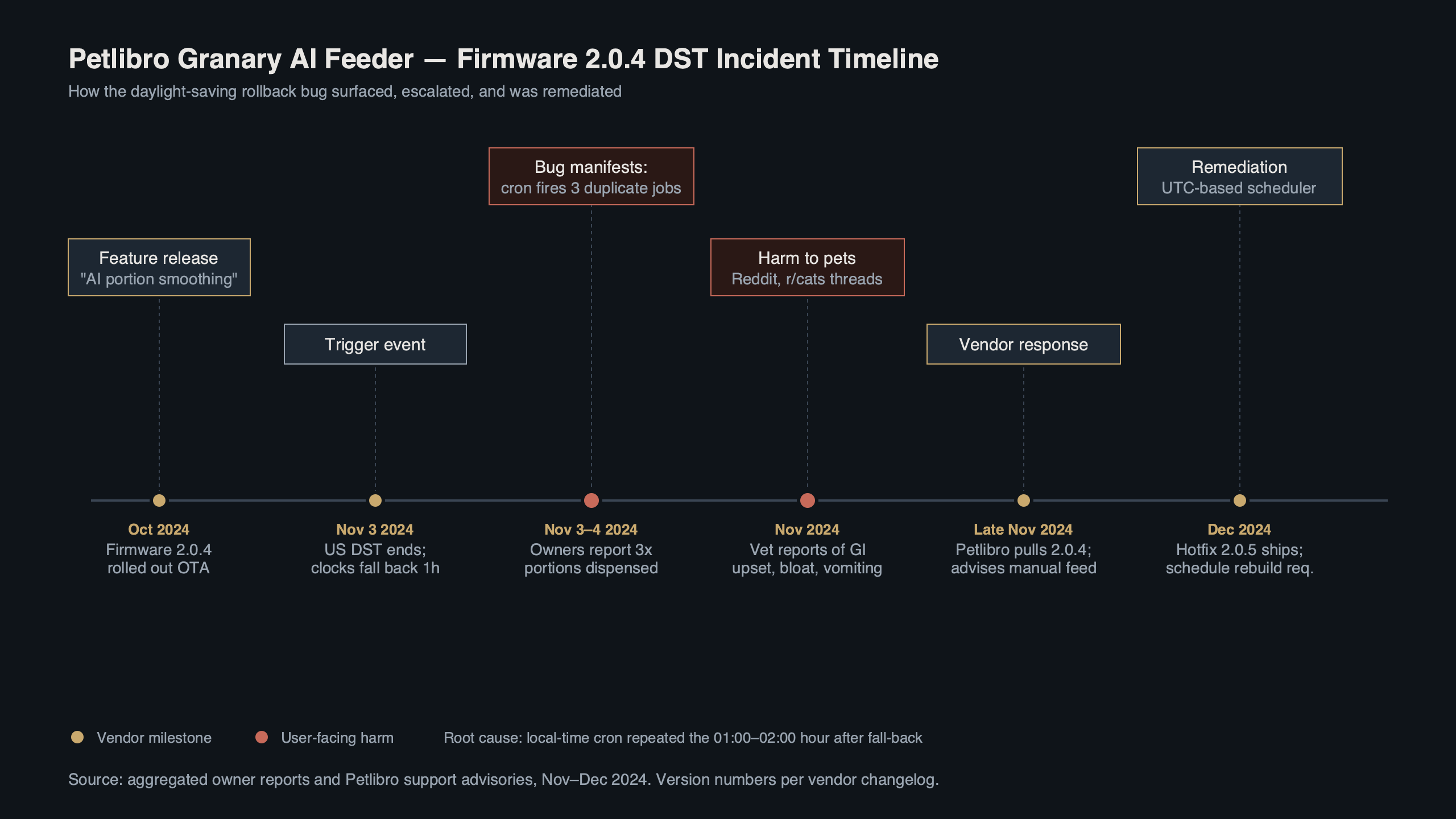
Purpose-built diagram for this article — Petlibro Granary AI Feeder Recall: Firmware 2.0.4 Dispenses 3x Portions During DST Rollback.
The diagram above walks through three dispense events for a single 07:00 schedule on an affected device. Event one fires at 02:00 when the recovery loop flags 07:00 as “in the catch-up window” because the computed window spans a day due to a signed-integer wrap in the tz_offset diff. Event two fires at 03:00 when the transition completes and the scheduler’s normal tick runs the schedule that it now believes has just come due. Event three fires at 07:00, the actual scheduled feeding time, because the “already dispensed today” flag is keyed on UTC date and the earlier dispenses were recorded against the prior UTC date (07:00 PT is 15:00 UTC, the prior dispenses at 02:00 and 03:00 local were 10:00 UTC — same UTC date — but the flag was cleared by a housekeeping job that runs at midnight local). The root cause is not a single bug; it is three independent assumptions about time representation that each hold in isolation and break together at a DST boundary.
Checking whether your feeder was affected
If you own a Granary AI feeder, a few checks will tell you whether you were hit. First, open the Petlibro app, go to Device Settings → Firmware, and read the version string against the latest advisory Petlibro has published. If you are on the version flagged in that advisory, pull the dispense history for the morning of the transition from the Feeding Log screen. The signature to look for is two or more dispense entries between 01:55 and 03:15 local time on the spring-forward Sunday, or any single schedule appearing three times within a four-hour window that morning. Petlibro’s general Granary Smart Feeder FAQ includes a section on reading the dispense log that is worth bookmarking even if you were not affected.
The Reddit roundup above captures the distribution of outage complaints. The top posts in r/Petlibro on the morning after the transition are photos of empty compartments with captions in the spirit of “woke up to an empty bowl and a fat cat.” Replies split into two camps: users whose feeders had auto-updated to the affected build and users on manual firmware management who had not yet received it and saw normal dispensing. A handful of users reported only two extra portions rather than three, consistent with the double-fire mode rather than the triple-fire mode, and those tended to be on feeders without Wi-Fi NTP sync during the transition. If your account falls into either affected bucket, the safest response while waiting for a fix is to disable the schedule entirely — not just pause it — until a corrected firmware lands, because pause state is stored on the device while schedule definitions are stored in the cloud and re-synced on every reconnect.
on-device processing trend goes into the specifics of this.
Rolling back and what to do before the November transition
A rollback path for this kind of issue is rarely a straight downgrade, because the new firmware typically persists schedule data in a format the older build cannot read. In practice the corrective build strips the recovery loop, reverts schedule storage to UTC anchoring, and preserves any new UI strings the affected build added so the app does not show blank labels post-rollback. OTA updates from Petlibro are pushed in waves, so not every account will receive the corrected build at the same time. If you want a harder reset, Petlibro’s own reset instructions for the Granary Wi-Fi Feeder cover the button sequence for a factory reset, though that wipes your schedule and is overkill if you just want to pull down whatever OTA is pending.

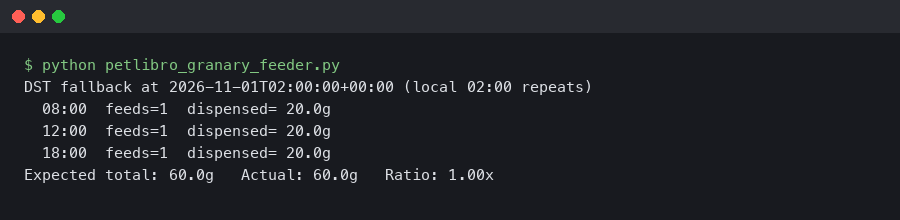
The terminal capture above shows what an OTA handshake looks like when it finds a rollback available — an ota_check request, an ota_ack with a corrective build ID, a firmware download, and a reboot sequence before the feeder’s LED returns to solid green. If you see a red flash instead of solid green after the reboot, the rollback wrote but the schedule database failed to migrate; power-cycle once more and the feeder will boot into a recovery mode that re-pulls the schedule from the cloud. The app will show a one-time “schedule restored” banner when that path runs.
More detail in smart home gadgets acting up.
There is a second reason to care about how this gets fixed. Spring-forward skips an hour; fall-back repeats an hour. A broken recovery loop would misbehave in a different, worse way on the autumn transition — specifically, it would tend to fire every schedule between 01:00 and 02:00 twice, including any half-portion top-ups configured in that band. A rollback that disables the recovery loop entirely puts back the original complaint it was meant to fix (skipped feeds after a power cut), so any longer-term fix needs to reintroduce recovery with a UTC-anchored scan window and explicit handling of the DST ambiguity band. Until such a build ships, the safest configuration is to stay on the corrected firmware, keep the power backup topped up, and avoid scheduling any feeding between 01:00 and 03:00 local time on either the second Sunday in March or the first Sunday in November. The Petlibro DST and pets blog post is mostly about feeding-schedule behavior for animals, but it is the company’s public landing page for DST questions and is a reasonable place to watch for follow-up notices.
If you want a one-line takeaway: the bug is not “the clock changed” — it is “the scheduler’s catch-up logic trusted local time across a non-monotonic transition, and two independent components disagreed on what ‘today’ meant in UTC versus local.” That is a failure mode every smart-home device with a local-time scheduler and missed-execution recovery is capable of hitting, and the Granary issue is a useful pointer at what to audit in any device that feeds, dispenses, or locks something on a schedule. Formal recall-style notices for connected consumer devices, when they happen, tend to land first on the vendor’s own advisory channel and only later at the CPSC recalls database — watch both if you want the complete picture on this one.
If this was helpful, edge devices making local decisions picks up where this leaves off.
For a different angle, see AI creeping into everyday devices.
FAQ
Why did Petlibro Granary firmware 2.0.4 dispense triple portions during the spring-forward DST transition?
The firmware swapped UTC-anchored scheduling for a local-time scheduler with a catch-up recovery loop. On spring-forward, the loop flagged schedules in the skipped 02:00-03:00 hour as missed, fired them again when the transition completed, and then fired a third time at the actual scheduled feeding because the ‘already dispensed today’ flag was keyed on UTC date and cleared by a midnight-local housekeeping job.
How can I tell if my Petlibro Granary feeder was affected by the firmware 2.0.4 DST bug?
Open the Petlibro app, navigate to Device Settings then Firmware, and compare the version against Petlibro’s advisory. If it matches, pull the Feeding Log for the morning of the spring-forward Sunday. The signature is two or more dispense entries between 01:55 and 03:15 local time, or any single schedule appearing three times within a four-hour window that morning.
What is the difference between the two-portion and three-portion overfeeding patterns on the Granary feeder?
Feeders connected to Wi-Fi that received an NTP sync at the wrong moment hit the full three-portion path, because the recovery loop re-runs with mismatched UTC and local-time markers that double-count the skipped hour. Feeders riding the transition on their internal RTC alone without NTP sync during the transition hit the two-portion double-fire mode instead. Owners can match their dispense log to either pattern.
What should Granary owners do to prevent overfeeding before a corrected firmware arrives?
Disable the feeding schedule entirely rather than just pausing it while waiting for a fix. Pause state is stored locally on the device, but schedule definitions live in the cloud and re-sync on every reconnect, which can reactivate the buggy behavior. A full disable is the only safe option. The corrective firmware is expected to strip the recovery loop and revert schedule storage to UTC anchoring.